![sr-logo.png]](https://knowledge.screenrights.org/hs-fs/hubfs/sr-logo.png?height=40&name=sr-logo.png)
Using Teammates under Settings, you can add your staff, managers, or anyone helping in your admin jobs.
To add a new Teammate:
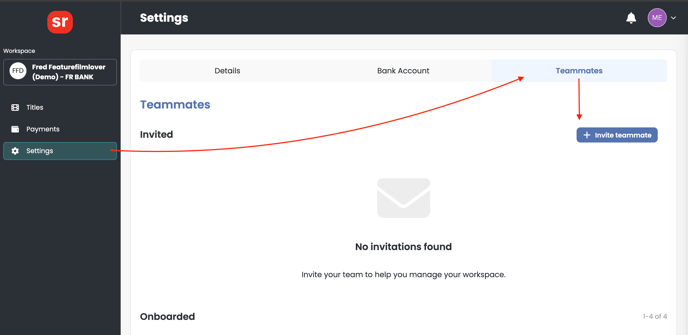
1. Navigate to your workspace, and click on Settings > Teammates > Invite teammate.
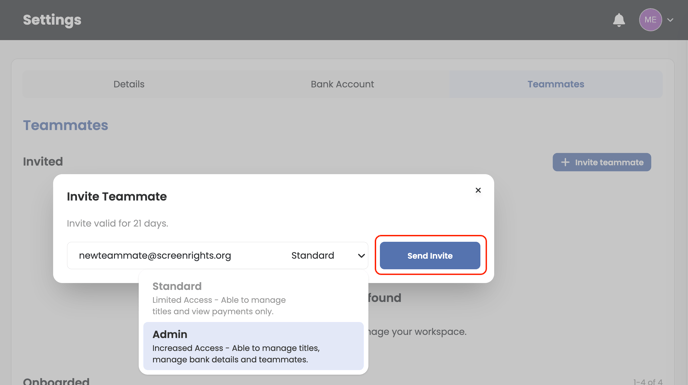
2. Enter the email address of the teammate you would like to invite and assign their access level.
We support two access levels:
- Standard - Can view and download payment statements, and view titles.
- Admin - Can manage settings, update bank account, and add teammates in addition to standard access features.
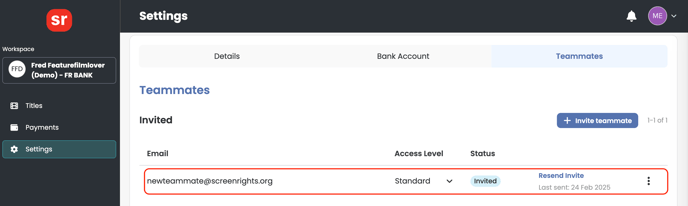
3. Once you have sent an invitation, a log will be saved under the Teammates section in Settings. You can track its status here and click to resend the invite if required. Invitations sent to teammates expire in 21 days.