---
title: I've Lost My Phone And Can't Authenticate
description: Lost your phone or authenticator? Use the Screenrights MFA reset flow to verify your email, sign in again, and set up MFA from scratch.
---
[Skip to content](https://knowledge.screenrights.org/en/authentication/i-lost-my-phone-or-authenticator-app#main-content)
English
Show submenu for translations
![sr-logo.png\]](https://knowledge.screenrights.org/hs-fs/hubfs/sr-logo.png?height=40&name=sr-logo.png)
Open main navigation
Close main navigation
- English
Show submenu for translations
-
How can we help you?
- There are no suggestions because the search field is empty.
1. [Screenrights](https://knowledge.screenrights.org/en?hsLang=en)
2. [Security & Privacy](https://knowledge.screenrights.org/en/security-privacy?hsLang=en)
3. [Multi-Factor Authentication](https://knowledge.screenrights.org/en/security-privacy?hsLang=en#multi-factor-authentication)
# I've Lost My Phone And Can't Authenticate
If you cannot access your authenticator code, use the [MFA reset](https://screenrights.app/auth/mfa-reset) page.
This allows you to reset your multi-factor authentication method by confirming a code sent to your registered email address.
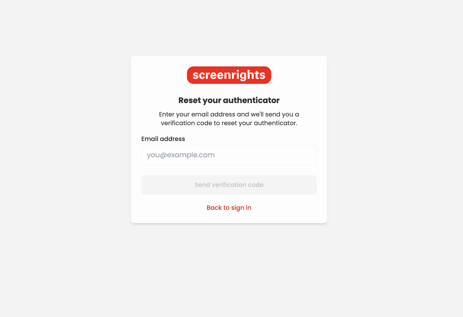
1. Open the [MFA reset](https://screenrights.app/auth/mfa-reset) page and enter your Screenrights email address.
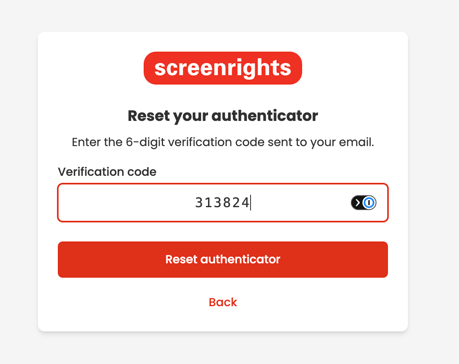
2. Enter the code sent to your email.
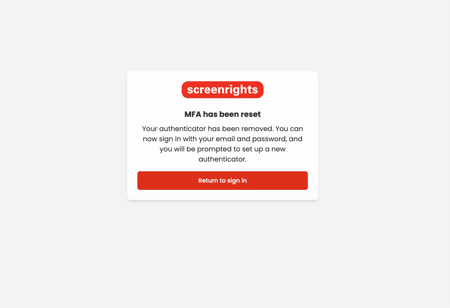
3. When the reset is complete, click to return to the sign-in page.
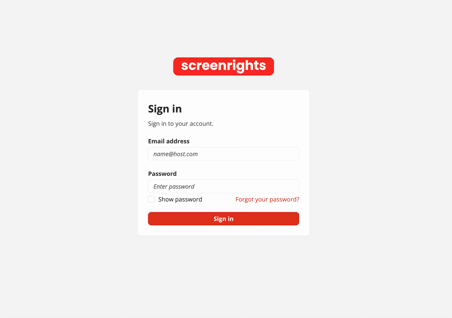
4. Sign in again with your email and password.
🔧 **Troubleshooting Tip:** If you do not have access to your registered email address, [contact support](https://knowledge.screenrights.org/en/contact-support?hsLang=en). We need to confirm your identity before changing account security settings.
- [Get Started](https://knowledge.screenrights.org/en/get-started?hsLang=en)
- [Security & Privacy](https://knowledge.screenrights.org/en/security-privacy?hsLang=en#main-content)
- [Multi-Factor Authentication](https://knowledge.screenrights.org/en/security-privacy?hsLang=en#multi-factor-authentication)
- [MyScreenrights](https://knowledge.screenrights.org/en/myscreenrights?hsLang=en)
- [Homepage](https://knowledge.screenrights.org/en/homepage?hsLang=en#main-content)
- [Frequently Asked Questions](https://knowledge.screenrights.org/en/homepage?hsLang=en#frequently-asked-questions)
- [Titles](https://knowledge.screenrights.org/en/titles?hsLang=en)
- [Clients (For Agencies Only)](https://knowledge.screenrights.org/en/clients-for-agencies-only?hsLang=en#main-content)
- [Frequently Asked Questions](https://knowledge.screenrights.org/en/clients-for-agencies-only?hsLang=en#frequently-asked-questions)
- [Earnings Statements](https://knowledge.screenrights.org/en/earnings-statements?hsLang=en#main-content)
- [Residuals](https://knowledge.screenrights.org/en/earnings-statements?hsLang=en#residuals)
- [Frequently Asked Questions](https://knowledge.screenrights.org/en/earnings-statements?hsLang=en#frequently-asked-questions)
- [My Tasks](https://knowledge.screenrights.org/en/my-tasks?hsLang=en#main-content)
- [Potential Claims](https://knowledge.screenrights.org/en/my-tasks?hsLang=en#potential-claims)
- [Competing Claims](https://knowledge.screenrights.org/en/my-tasks?hsLang=en#competing-claims)
- [Frequently Asked Questions](https://knowledge.screenrights.org/en/my-tasks?hsLang=en#frequently-asked-questions)
- [Collection Account Management](https://knowledge.screenrights.org/en/collection-account-management?hsLang=en)
- [Workspace Settings](https://knowledge.screenrights.org/en/workspace-settings?hsLang=en#main-content)
- [Frequently Asked Questions](https://knowledge.screenrights.org/en/workspace-settings?hsLang=en#frequently-asked-questions)
- [Teammates](https://knowledge.screenrights.org/en/teammates?hsLang=en#main-content)
- [Frequently Asked Questions](https://knowledge.screenrights.org/en/teammates?hsLang=en#frequently-asked-questions)
- [Bank Details](https://knowledge.screenrights.org/en/bank-details?hsLang=en)
- [General Questions](https://knowledge.screenrights.org/en/general-questions?hsLang=en)
- [Contact Us](https://knowledge.screenrights.org/en/contact-us?hsLang=en)
# Screenrights
www.screenrights.org | Image: Luke Nguyen's Food Trail, Red Creative Media
Copyright © 2026, Screenrights